Button remapping
Send any button to another button, a key chord, a macro, or nothing. Side buttons finally do something.
 Cursorsmith
Remap buttons, shape the acceleration curve, tune scrolling, switch profiles per app. One small Rust program, one TOML file, no account.
Honest status: pre-release. No installers are published yet. Source is private for now, public soon.
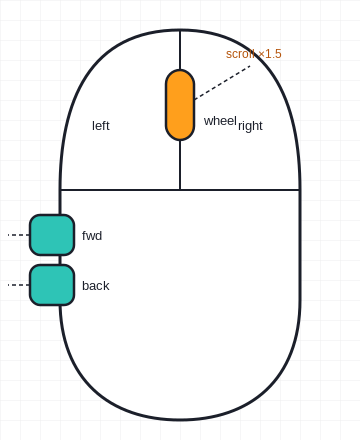
Send any button to another button, a key chord, a macro, or nothing. Side buttons finally do something.
Flat, linear, power, sigmoid or hand-placed points. Measured in inches per second, so a profile survives a DPI change.
Vertical and horizontal speed, inversion, and fractional carry so slow wheels do not lose notches.
Map a program name to a profile: flat for games, gentle curve for the desktop. Automatic detection is still on the to-do list.
Hold a button and flick for a gesture; hold one button and press another for a chord. A plain tap still clicks.
Key taps, key down/up, clicks and delays in a named sequence you can bind anywhere.
Readable, diffable, yours. No account, no cloud, no telemetry code in the repository.
Validated on one real mouse: reading the general and LED settings, and one LED effect change with read-back and restore (LED bytes only, backup first, --i-understand). Protocol-only: DPI, buttons and polling layouts are inferred from a sibling device (30fa:1440) and are never written. Planned: LOD and onboard macros (format unknown).
A pure engine you can test without a mouse: the CLI can replay scripted events and print the result.
Move the speed slider and watch the gain. Same formulas as the Rust engine; the DPI readout shows why input is measured in inches per second.
No prebuilt binaries yet. You need Rust (stable).
cd cursorsmith   # source checkout (private for now, public soon)
cargo build --release
./target/release/cursorsmith init
./target/release/cursorsmith-gui
Running the remapper needs access to /dev/input and /dev/uinput (input group + udev rule, see README). Works on X11 and Wayland. Build-verified; not yet run on a real mouse.
cargo build --release
Untested. Button remapping only, no acceleration yet. Some apps may require running elevated.
cargo build --release
Untested. Needs Accessibility / Input Monitoring permission. Button remapping only, no acceleration yet.
Example generated by cursorsmith init: a sigmoid curve, a back button that sends Alt+Left, a hold-to-slow sniper button, a gesture, a chord that runs a macro, and a flat profile for one game.
default_profile = "daily"

[[profiles]]
name = "daily"
gesture_threshold = 120

[profiles.accel]
dpi = 1600.0
sensitivity = 1.0
[profiles.accel.curve]
kind = "sigmoid"
min_gain = 0.8
max_gain = 2.4
midpoint = 8.0
steepness = 0.5

[profiles.scroll]
multiplier = 1.5
invert = false
horizontal_multiplier = 1.0

[[profiles.buttons]]
button = "back"
[profiles.buttons.action]
type = "keys"
chord = "alt+left"

[[profiles.buttons]]
button = "extra1"
[profiles.buttons.action]
type = "sensitivity"
factor = 0.35

[[profiles.gestures]]
hold = "forward"
direction = "left"
[profiles.gestures.action]
type = "keys"
chord = "ctrl+alt+left"

[[profiles.chords]]
hold = "middle"
press = "right"
[profiles.chords.action]
type = "macro"
name = "paste-plain"

[[profiles.macros]]
name = "paste-plain"
steps = [
  { step = "tap", key = "ctrl+shift+v" },
  { step = "delay", ms = 30 },
]

[[profiles]]
name = "fps"
[profiles.accel]
dpi = 1600.0
sensitivity = 1.0
[profiles.accel.curve]
kind = "flat"

[[apps]]
matches = "quake"
profile = "fps"Not yet. There are no releases; build from source with Cargo (instructions above). The source is private for now and will be made public soon.
Linux is the primary target and builds and passes tests; its device backend has not yet been run against a real mouse by the author. Windows and macOS backends are experimental, uncompiled, and limited to button remapping.
The cross-platform input library exposes absolute positions, not relative motion. Doing it properly needs OS-specific code that is not written yet.
The Linux backend reads devices below the compositor, so it does not depend on X11 or Wayland. The catch: Wayland has no standard way to ask which app is focused, so per-app switching needs a manual --app flag for now.
Only for the EWEADN MK500's LED settings, on explicit request (--i-understand), after a backup and with a read-back check; tested once on one real mouse. Nothing else is written, and the remapping/acceleration engine never touches onboard memory (see docs/PROTOCOL.md). For other supported mice see Piper/libratbag.
Cursorsmith takes exclusive control of the device while running. If something goes wrong the mouse can appear frozen until the process stops, so test with a second input device nearby.
Nothing. There is no network code, account or analytics in the source.
MIT.